
Talk · Know · Get things done
Your Website
Can Talk Now.
They tap the mic. It answers out loud.
Speakeasy™ gives the Xblu AI Assistant a voice. Visitors speak to your website the way they'd talk to a person at the front desk, and it answers in under a second, on the same approved knowledge, personality and pages as your chat window. No app, no phone call, no form.
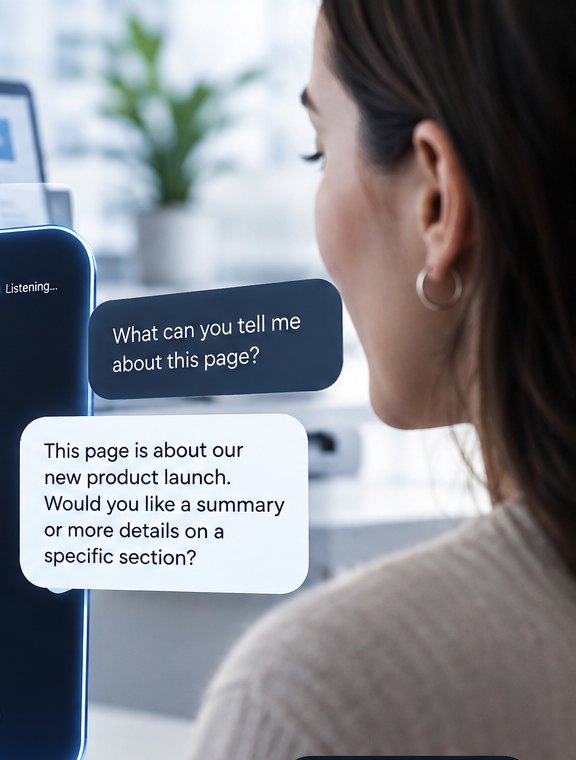
Knowledge at your voice.
A More Human Way to Get Answers.
People would rather talk to a person. We know. Speakeasy™ is built around that: a voice with warmth in it, a personality you choose, a conversation that goes where the visitor takes it. It is not a person, and it never pretends to be one. But it talks like somebody who likes their job and knows the answer.
Talks and listens like a person
Real back-and-forth. Interrupt it, change the subject, ask the dumb question. It keeps up, the way a good conversation does.
Has a mood and a point of view
You pick the personality. Warm, dry, upbeat, unhurried. It greets people the way you would, and it stays in character.
Knows what you know
Everything you have written, on every page, in one memory. It knows the page the visitor is on and brings in the rest when it helps.
Gets to the point
Nobody wants to read. They want to ask. A sentence, a next step, done. Faster than a search box, friendlier than a form.
One Brain. Two Ways to Talk to It.
Speakeasy™ is not a second chatbot. It's the same Xblu AI Assistant you already set up, with ears and a voice. Everything you taught it, it says out loud.
Same approved knowledge
Hours, services, policies, the book, the menu, the catalog. Set it once in the AI Assistant; chat and voice both use it.
Same personality
Friendly, professional, playful, upscale or direct. The tone you picked is the tone it speaks in, in English, Spanish, German or Polish.
It reads your site while it talks
Ask about a page, a post, a product. It searches your site's content index mid-sentence and answers from the actual page.
Same Dashboard
Spoken conversations land next to typed ones. You read what people asked, what it said, and which pages they were on.
Why People Talk When They Won't Type
A chat window asks visitors to write. A voice asks them to say what they mean. That changes who engages and how long they stay.
Big information, small questions
A 900-page book, a 40-page service catalog, a policy manual nobody reads. Voice turns all of it into a conversation. The visitor asks one thing; it answers that one thing, from the whole.
Built for phones
Most of your visitors are on a phone, where typing is a chore. Tap, talk, listen. On a phone, Speakeasy™ opens full screen so there's nothing else to look at.
Interrupt it, like a person
Start talking while it's talking and it stops to listen. Nobody waits for a paragraph to finish. The conversation moves at the visitor's pace.
Four languages, one voice
Visitors speak Spanish, German or Polish and it answers in kind, with the right formality. Your knowledge can stay in English.
Accessible by default
People who find reading on a screen hard, or typing slow, get the same answers everyone else does. Captions run alongside the voice for everyone else.
It still gets the lead
When a visitor has a real need, it points them to the contact button, a booking with Good Morning, or your form, the same way the chat does.
Live demo
Have a Conversation With It.
This is the real thing, running right here on xblu.com. Tap the mic, allow the microphone, and ask it anything about Xblu. Talk over it if you like. Each conversation runs up to three minutes.
Want this on your site?
Leave your details and we'll set it up with you: pick the voice, write the greeting, set the budget, and connect it to your AI Assistant. Starts with a free 20-minute consultation.
We'll be in touch within a business day.
Three Places It Can Live
Turn any of them on from the settings page. Mix them. The voice is the same; only the doorway changes.
The floating "Talk" button
A small pill above your chat launcher: "Talk to Bella's", "Talk to The Forge". One tap opens the voice panel. On phones it takes the whole screen.
A mic inside the chat
A visitor who started typing can switch to talking without losing the thread. Both sides of the conversation go to the same transcript.
A full page of its own
Drop one line in any page, post or Divi module and you get a large, always-on voice panel. A "Virtual Guide" page, a kiosk screen, a landing page for an ad.
Make it yours
Everything You Can Set
No code. It's a settings page, and most of it is already filled in from your AI Assistant.
What People Do With It
The author with a 900-page book
A historian's research site with hundreds of articles on sacred geometry, navigation and Southwest history. Nobody reads it top to bottom. Visitors now ask "why Pagosa Springs?" and get the answer, with the page it came from.
The restaurant on a Friday night
"Do you have anything gluten-free?" "Can I get a table for six at seven?" It answers from the menu and hands the booking to Good Morning, while the phone line stays open for people who still want it.
The contractor's estimate
"Do you do metal roofs in Joliet?" It answers, asks two questions a good estimator would ask, and invites them to request a quote. The transcript lands in Carma CRM with the lead.
The museum, the school, the clinic
Hours, directions, what to bring, what's included, in four languages, for the visitor who would never have scrolled to the FAQ. Every answer traced back to approved text you wrote.
Safe, Metered, Yours
Your key stays home
Your OpenAI key never leaves your WordPress server. The visitor's browser gets a two-minute pass to open one conversation and nothing else.
Pennies, not dollars
About a dime for a three-minute conversation on the standard model. The daily budget you set is a hard ceiling, reserved before each conversation starts.
Same guardrails as the chat
It only states business facts from your approved knowledge, never guarantees results, ignores attempts to change its rules, and says "I'm not sure" instead of guessing.
Transcripts you control
Keep spoken conversations in the Dashboard with the typed ones, or keep counts only. Your retention setting applies to both.
Works where your visitors are
Chrome, Safari, Edge, Firefox, iPhone and Android. If a browser can't do live voice, the chat window is one tap away.
Licensed and updated
Part of the Xblu app family: signed updates in your WordPress dashboard, one license per site, and a 14-day trial to hear it on your own pages.
Questions People Ask
Do I need the Xblu AI Assistant first?
Yes. Speakeasy™ is the spoken side of the AI Assistant and runs on its knowledge, personality, site index and Dashboard. If you already have the Assistant, Speakeasy™ is a second plugin and a settings page.
What does it cost to run?
Beyond the license, you pay OpenAI for talk time, roughly a cent a minute while the visitor talks and a little over two cents a minute while it talks. A typical three-minute conversation is about ten cents. You set a daily budget and it never goes past it.
Can it hear in a noisy room?
It cleans up the microphone before it listens, and you can tell it whether visitors are on a headset or a laptop across a room. It also waits for a pause you choose before it answers, so it doesn't jump in mid-sentence.
What if someone asks it something it doesn't know?
It says it isn't sure and offers your contact option, exactly like the chat. It can also search your site's pages while talking, so a question about a specific product or article gets the real answer with the page it came from.
Does it work in Spanish?
Spanish, German and Polish, with the right formality for each. A visitor who speaks Spanish to it gets Spanish back, even if your approved knowledge is written in English.
Can I put it on its own page?
Yes. One shortcode gives you a large voice panel inside any page, post or Divi module. We use it for "Virtual Guide" pages, kiosks and ad landing pages.
Speakeasy™
Give Your Website a Voice This Week.
We install it, pick the voice with you, tune the greeting and the budget, and hand you a page you can show your customers.
