
Pulse™ by XBLU

Your Store's Heartbeat.
Right on Your Dashboard.
You already have analytics. Now you'll actually look.
Pulse™ puts the numbers that matter at the top of the WordPress dashboard you already log into: who's on your site right now, how many came this week, which products they're circling, how long they stay and where they came from. Pick any date range. Flip to Google Analytics for sources, cities and devices. No other tab, no report to dig for. Seven seconds, then back to work.



Why it exists
The Report Nobody Opens Is Worth Nothing.
Every store has Google Analytics. Almost nobody logs in. It's a separate site, a property picker, four menus and a report that answers a question you didn't ask. So decisions about what to feature, what to order and where to post get made on gut feel. Pulse moves the numbers to where you already are.
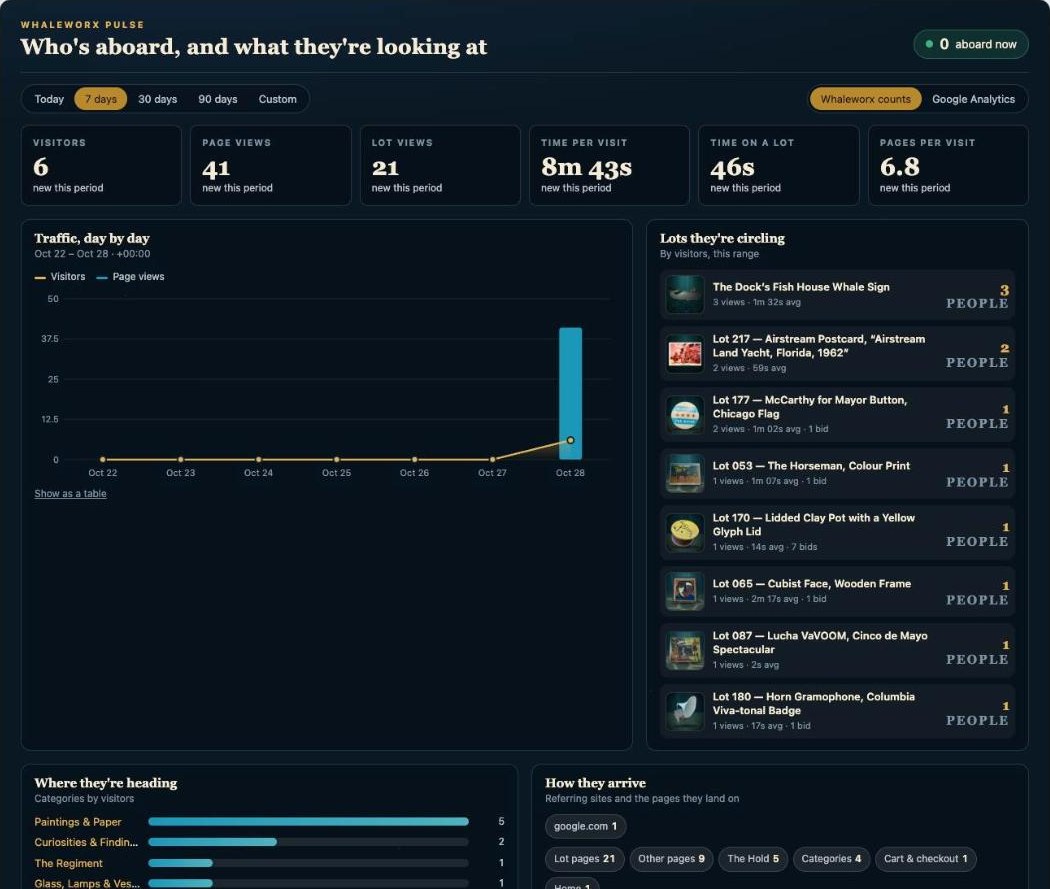
to read the whole panel. Six numbers, one chart, your top products and categories, and where people came from. Every number shows its change against the last period.
extra logins. It's the first thing on your WordPress dashboard, above everything else. Log in to add a product and you've already seen it.
sources, one switch. Your store's own cookie-free count, and Google Analytics when you want sources, cities and devices.
What you see
The Whole Store in One Screen.
This is the real panel, live on Whaleworx, a Chicago shop that runs on Xblu's intelligent commerce engine. Yours looks the same with your products in it.
 12345
12345Built for retail
Numbers Are Only Useful If They Change What You Do Next.
Four decisions every retailer makes each week, and how Pulse makes them in a glance instead of a guess.
What to feature
Products lots of people look at but don't buy want a better photo, a story, a bundle or a price nudge. They're at the top of your list.
"38 people looked at the gramophone. It leads the newsletter."
What to stock
Categories by visitors show where demand is running before you place a reorder or spend a Saturday at the market.
"Paintings pull three times what glass does. Buy art."
Where to promote
Sources and cities from Google Analytics show which channel is actually sending people, and from where.
"Facebook sent four times what Instagram did. Post there first."
When to act
Busiest hour, time on page and the live count tell you when shoppers are present, so you launch, reply and run promotions while they're here.
"Three on the site and it's 8 pm. Drop the Friday sale now."
Two sources, one panel
Your Own Count, Plus Google's.
Pulse counts visits itself, with nothing a privacy banner would need to mention. Connect Google Analytics with a read-only key and the same panel fills with everything Google knows.
Your store's own count
- Every product and category view, and the real seconds a page is in front of someone
- No cookies, no consent banner, no outside script
- You and your staff are never counted while logged in; bots are filtered
- "Here now" live count, refreshed every minute
- Top products with photos, views and time spent
- Works the minute it's switched on
Google Analytics
- Users, sessions, page views, average session
- Traffic sources: direct, Facebook, Instagram, search, email
- Cities and devices
- Top pages across the whole site
- Realtime active users from Google
- Read-only access through a service account; the key stays on your server
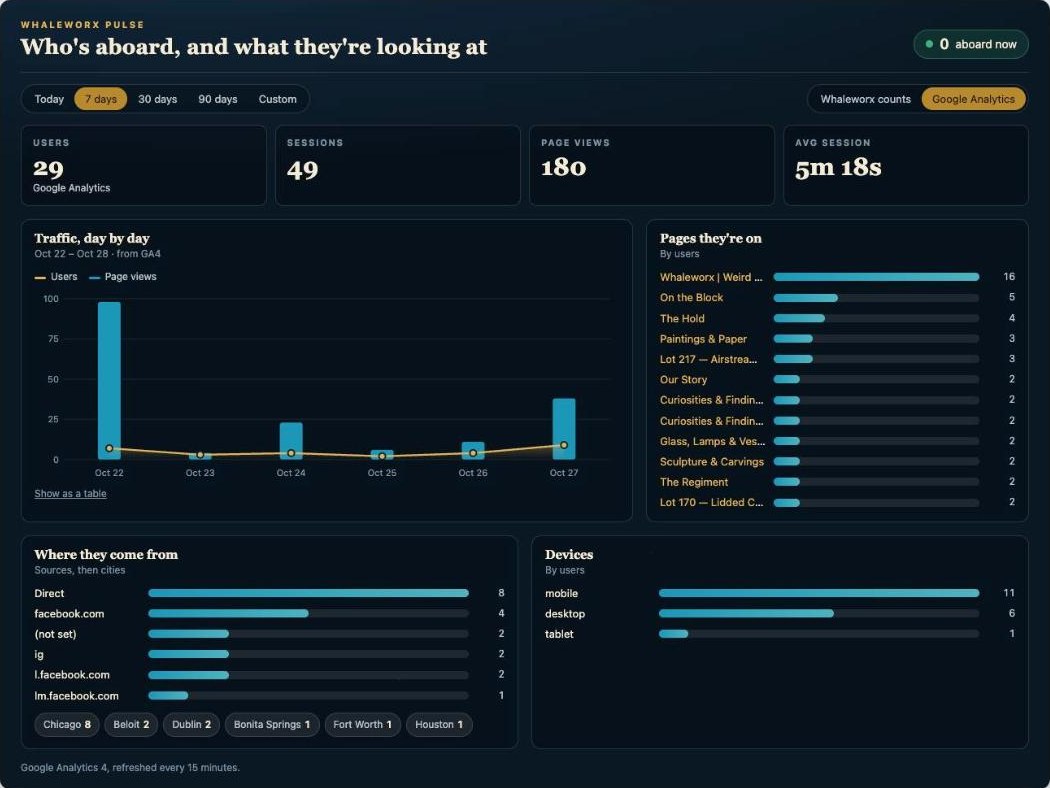
The Google Analytics view. Users, sessions, page views and average session, then top pages, sources, cities and devices. Refreshed every fifteen minutes.
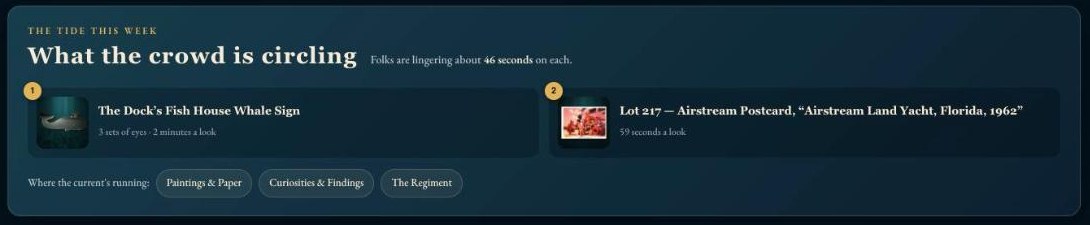
Optional: let shoppers see the crowd. A small panel on your shop shows the week's most-viewed products and how long people linger. Real social proof, in your store's voice. It stays quiet on a slow week.
Who it's for
Any Store That Runs on WordPress.
Pulse is built into every store on Xblu's intelligent commerce engine and installs on any WooCommerce site.
Boutiques
See which pieces get tried on by eye but never bought, and feature them while they're hot.
Vintage, thrift & resale
One-of-a-kind inventory means no reorder data. Pulse tells you what the crowd is circling before it's gone.
Specialty retail
Know which categories are pulling, which cities are shopping, and whether phones or desktops are converting.
Multi-location
Pair it with Carma CRM™ and the AI Assistant™: hold requests, questions and traffic in one morning glance.
Up and Running in a Morning.
We install it
Pulse goes on your WordPress site and starts counting the same day. Your dashboard changes; nothing on your storefront does.
We connect Google
About ten minutes: a read-only service account on your Google Analytics property, pasted into Pulse's settings. Sources, cities and devices appear.
You read it every morning
Seven seconds at login. We check in after the first month to show you what it's been telling you.
FAQs
What Pulse counts, what it doesn't, and how it fits with the rest of your store.
What is Pulse?
Pulse is a WordPress plugin from Xblu that puts live store analytics at the top of your dashboard: visitors, page views, the products people are looking at, how long they stay, where they came from and who's on the site right now, for any date range. It counts your visits itself and can also show your Google Analytics data in the same panel.
Do I still need Google Analytics?
No, but it helps. Pulse's own count covers visitors, products, categories and time on site with no setup. Google Analytics adds traffic sources, cities, devices and realtime users. If you already have it, we connect it in about ten minutes and you never have to open it again.
Does it use cookies or need a consent banner?
Pulse's own counting uses no cookies. A random tag lives in the browser tab and disappears when the tab closes; no names, emails or IP addresses are stored. If your site already runs Google Analytics, that tag's requirements are unchanged.
Will it count me and my staff?
No. Anyone logged in who can edit the site is skipped, so your own work on the store doesn't inflate the numbers. Known bots, crawlers and uptime monitors are filtered too.
Can shoppers see the numbers?
Only if you want. An optional panel on your shop shows the week's most-viewed products and how long people linger, written in your store's voice. It hides itself on a quiet week and only shows counts once they're big enough to be flattering; you set the thresholds.
Does it work with WooCommerce? With Shopify?
It's built for WordPress and WooCommerce, where it knows your products and categories by name. For Shopify and other platforms, talk to us about the best setup.
Is my Google key safe?
The service-account key is stored in your WordPress database and used only on the server to read reports. It never appears in the browser, the page source or an email, and it can't change anything in your Google account.
What does it cost?
Pulse is included with every store Xblu builds on the intelligent commerce engine. For an existing WordPress store, book a 20-minute store review and you'll leave with a clear plan and real numbers.

Know Your Store Before Coffee.
We'll put Pulse on your dashboard, connect Google, and show you what your shoppers have been telling you all along.
