Picture a lake resort in the Northwoods on a Monday in shoulder season. Condos along the shore, a main lodge, a golf course, a marina full of pontoons and, in a few weeks, a shed full of snowmobiles. One maintenance crew covers all of it.
Now picture how the work used to come in: a text to the manager’s personal phone, a call on the radio, a sticky note on the front desk, a guest who stopped someone on the path. Half of it made it to a whiteboard. The other half made it to “I thought you had that.”
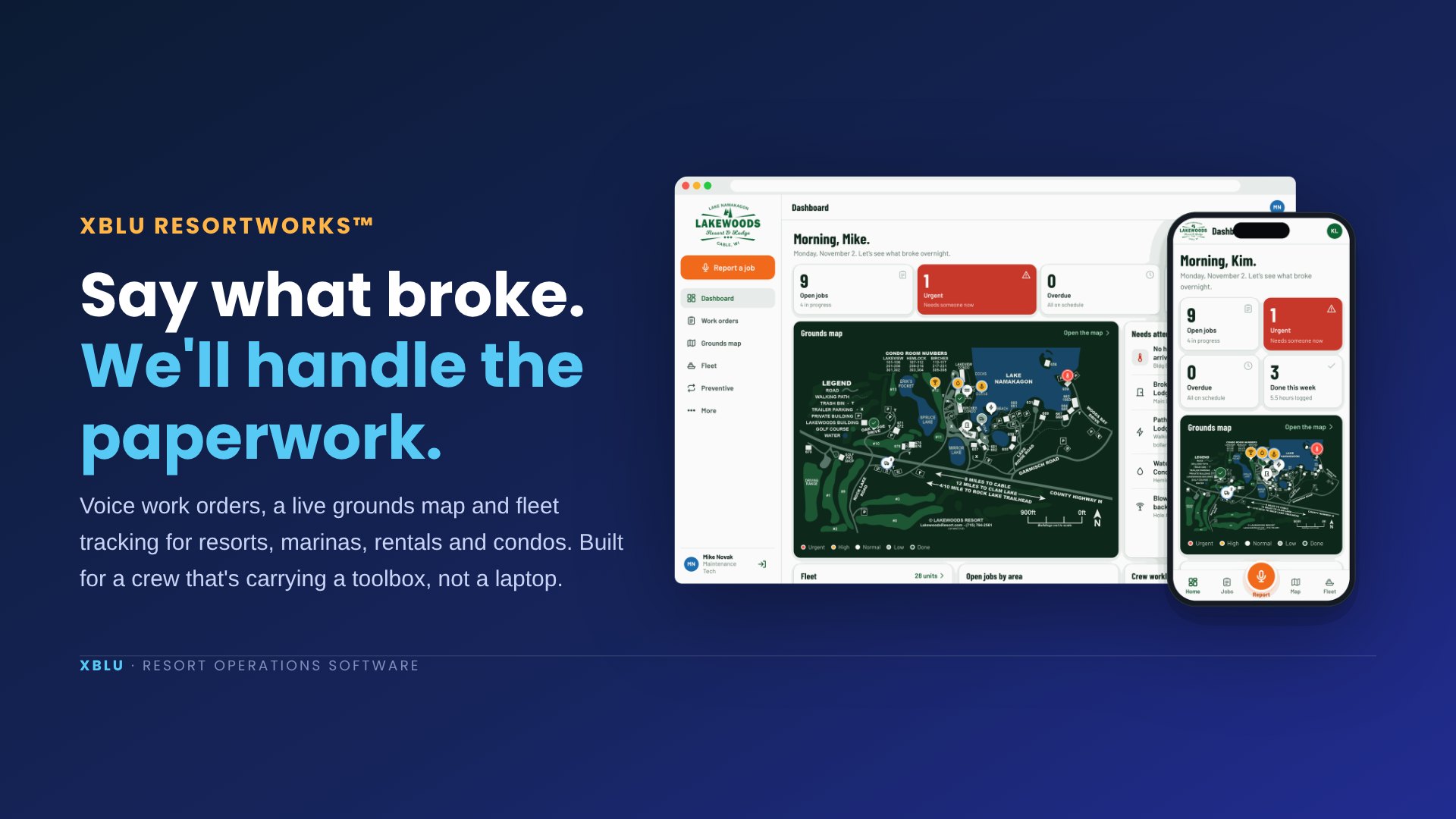
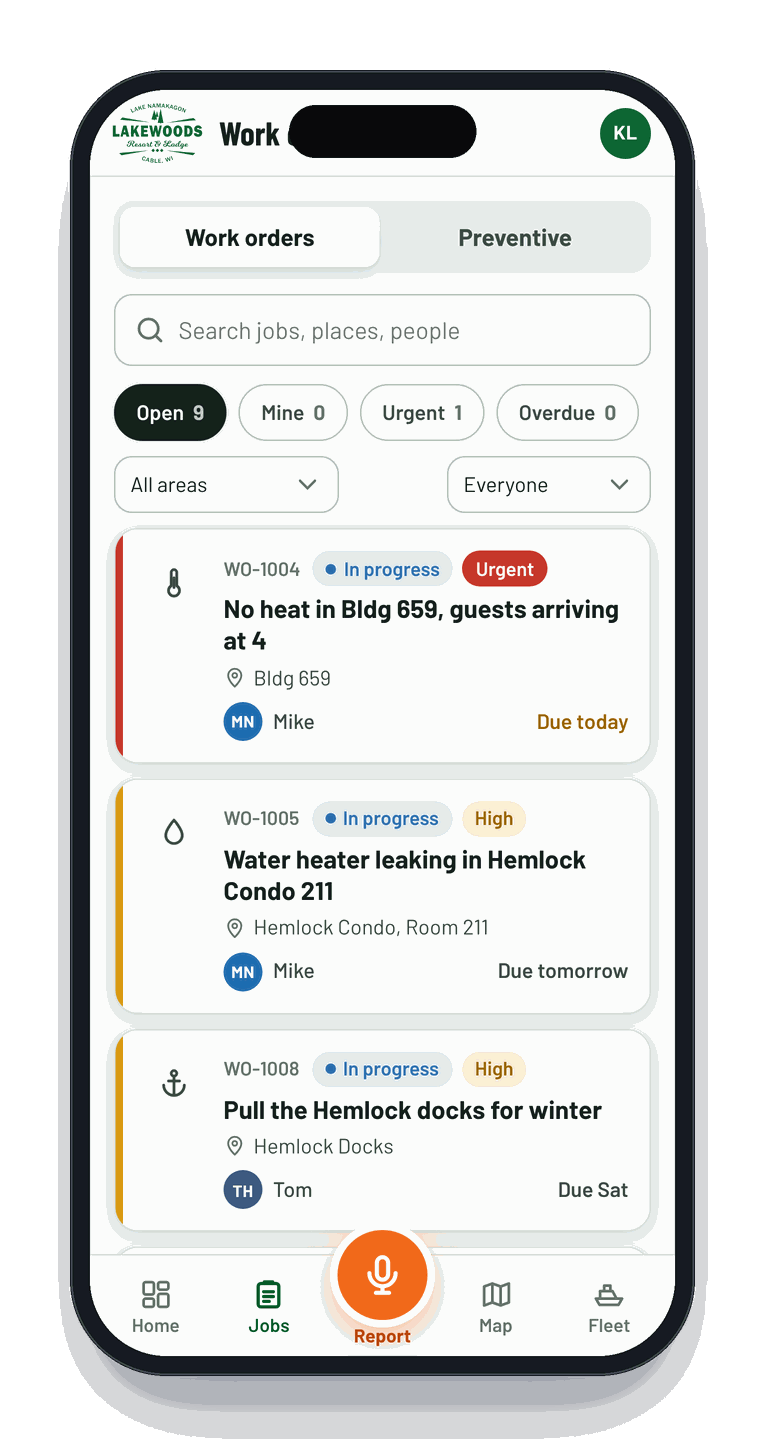
That’s the problem we were asked to fix. The result is ResortWorks™, resort maintenance software that lets anyone on the crew report a problem by talking into their phone, and turns it into a real work order with the place, the priority, the person and the due date already filled in.
From a sentence to a work order
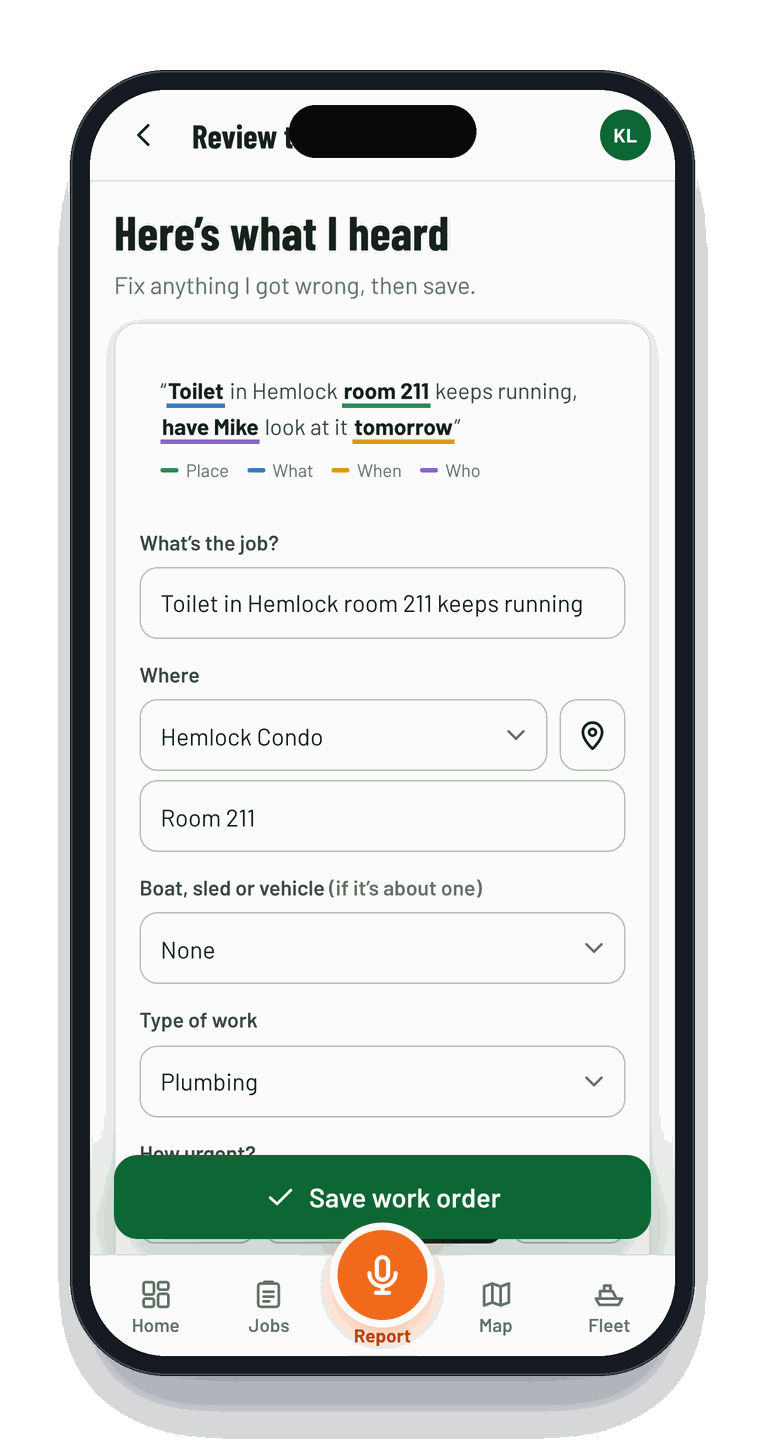
Said into the phone"Toilet in Hemlock room two eleven keeps running, have Mike look at it tomorrow."
How it works, in plain English
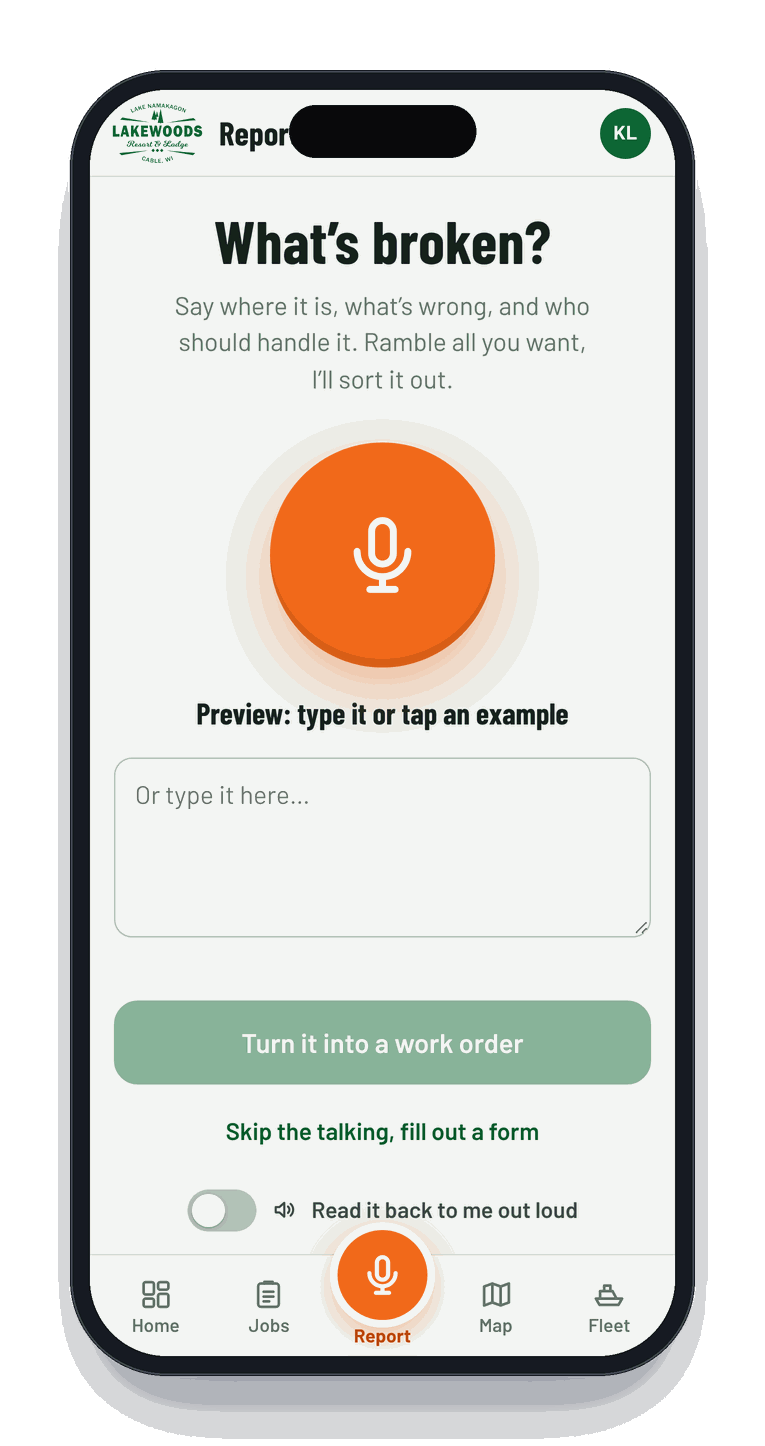
Report by voice. Anyone on the crew taps the mic and says what’s wrong, the same way they’d say it on the radio. ResortWorks knows the property: building numbers, condo room ranges, docks, roads, golf holes and every boat and sled in the fleet. “Six fifty nine” means Building 659. “Pontoon six” means Pontoon #6. One recording can hold several jobs, so “also a bunker washed out on hole three” becomes a second work order.
Check and save. The filled-in job comes back for a quick look. Fix anything with a tap, snap a photo, save. If the phone has no signal, it saves anyway and syncs later, which matters on a property where the far docks are a dead zone.
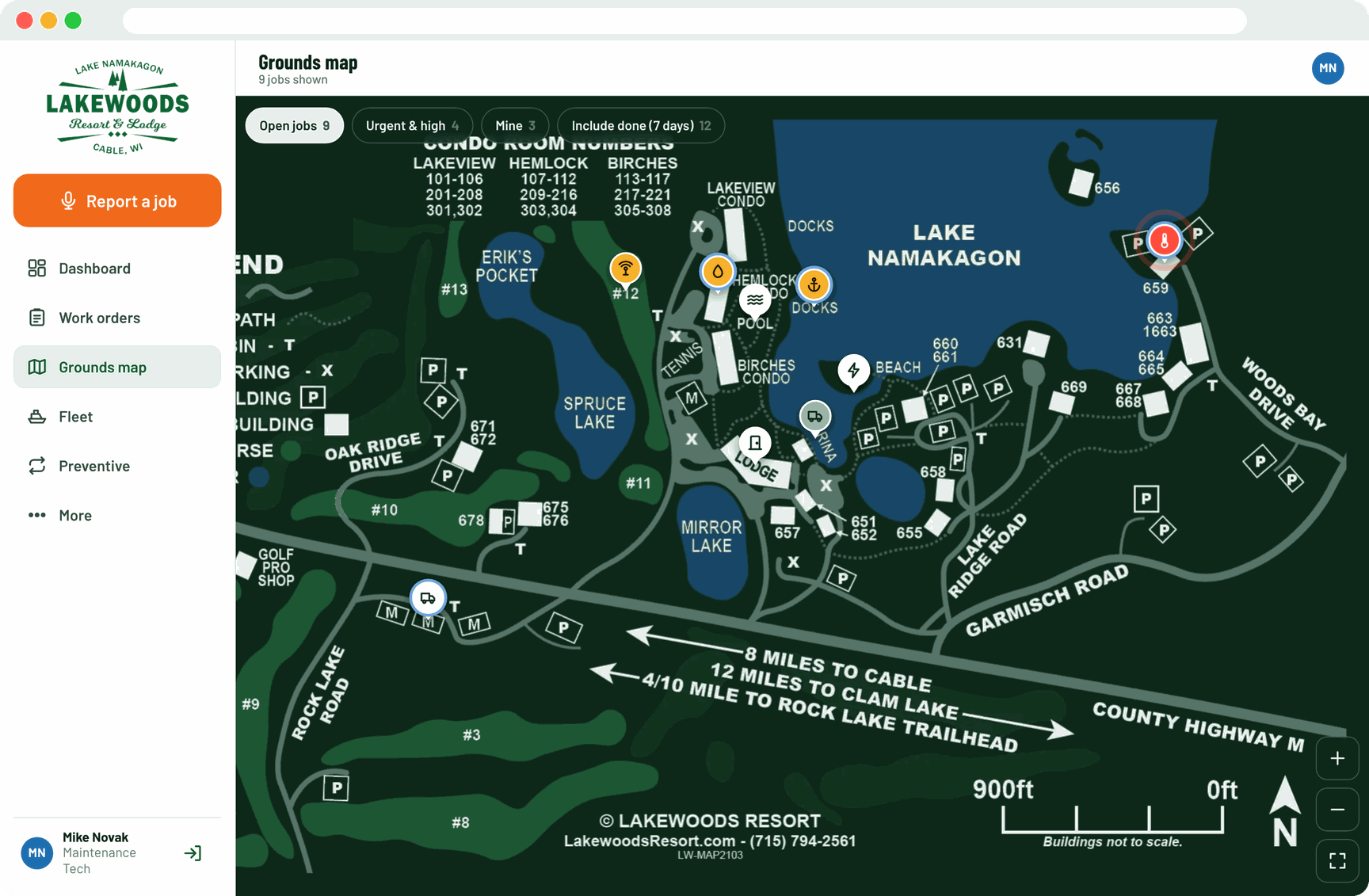
See it on the map. Every open job becomes a pin on the resort’s own grounds map, color-coded by urgency. Tap a pin and the job opens. A new hire who doesn’t know where “the shed past 659” is can still find it.
The fleet: pontoons to snowmobiles
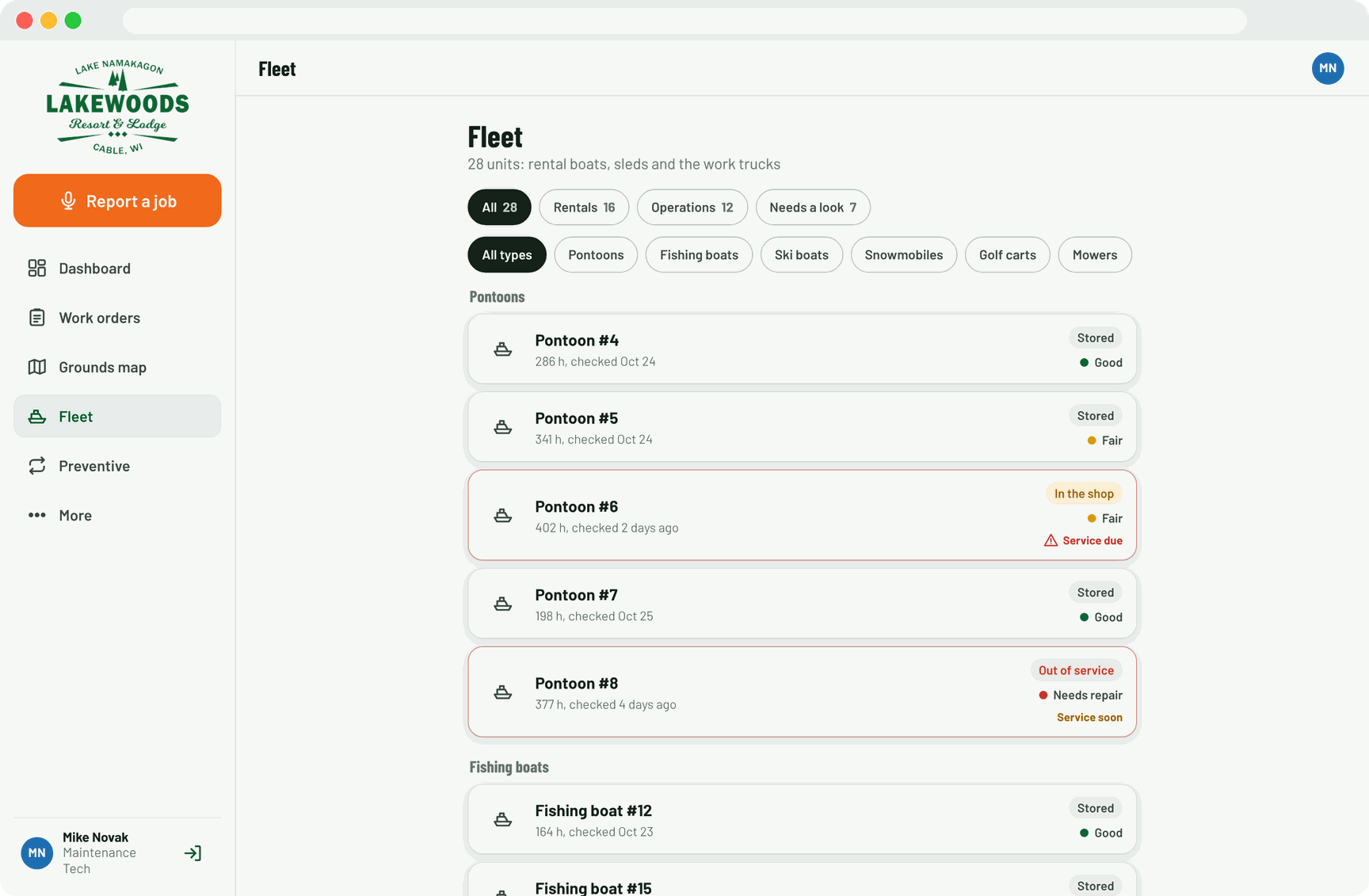
A resort with a marina is really two businesses, and the second one has engines. ResortWorks gives every pontoon, fishing boat, ski boat, snowmobile, golf cart, mower, UTV and truck its own card with a status: available, rented, in the shop, out of service or stored for the season.
When a rental comes back, the dock hand runs a 15-second condition check: condition, hours, fuel, anything broken. Service intervals run by hours, miles or months, and the unit gets a “service due” flag before it becomes a breakdown on someone’s vacation. Every job ever done to a unit stays in its history, which is handy when the insurance adjuster or the next season’s crew asks.
What it changes for resorts, marinas, rentals and condos
The software is the visible part. The real benefit is that the work stops depending on who remembered what.
- Nothing falls through the cracks. Every request becomes a job with an owner and a due date, whether it came from a guest, the front desk or the guy mowing hole 8.
- Managers stop chasing. The dashboard shows what’s open, what’s urgent, what’s overdue and who’s swamped. A big-screen mode lives on the shop TV.
- Rentals stay rentable. Hours-based service and return checks keep boats and sleds off the “sorry, it’s down today” list.
- Preventive work happens on time. Filters, extinguishers, smoke detectors, plow trucks, docks in and docks out: set once, opened automatically a few days before they’re due.
- A history you can actually use. Owners, boards and HOA committees can see what was done, when, and by whom. CSV export covers the meeting.
Resorts & lodges
Marinas & boat rentals
Vacation rentals & condos
HOAs & campgrounds
How Xblu built it
ResortWorks didn’t start as a product. It started as a site visit. Before writing any code, the Xblu team went in to understand the situation: how the resort actually ran day to day, who did what, and where the work was getting lost.
Then we did the analysis. We gathered every resource the property already had: the grounds map, the building and condo room numbering, the full fleet list, the recurring seasonal chores and the way the crew talked about all of it. That last part turned out to matter most. Nobody on a maintenance crew says “Unit 211, Hemlock Building.” They say “Hemlock two eleven.”
We built around the hardest moment in the job: a tech with full hands, a guest waiting and one bar of signal. That meant voice first, huge buttons, plain words and an app that keeps working offline. The resort’s own map went in, recolored to match, with every building, dock and hole placed on it.
Then came a few rounds of revisions with the people using it. The parser learned local lingo and the condo room ranges. The fleet got its real numbering. The copy got friendlier, and a little funny, because a crew that smiles at an app is a crew that opens it. We tuned the server setup for the resort’s hosting so it would run quietly alongside everything else.
01Understand
On-site walkthrough, crew interviews, a day of watching how requests really arrive.
02Analyze
Map, numbering, fleet list, seasonal chores, roles. What's urgent here versus "when you get to it."
03Build
Voice-first mobile app, live dashboard, grounds map with pins, fleet and preventive maintenance.
04Revise
A few feedback rounds: local lingo, room ranges, fleet numbers, friendlier voice, hosting tune-up.
05Adapt
New workflows, new properties and new fleets added in days, because Xblu owns the code.
Built to change
The part we’re proudest of isn’t any one screen. It’s that the whole thing is ours to bend. Because Xblu designed and wrote ResortWorks, adding a housekeeping checklist, a rental check-in flow, a new building or a second property is a quick change, not a new vendor and a new contract. When the next challenge shows up, and at a resort it always does, the tool adapts to the crew instead of the other way around.
If you run a resort, a marina, a rental fleet or a condo property and any of this sounds familiar, we’d love to show you ResortWorks running on a demo property, then talk about what it would look like on yours.
See it on your property
Let's put your map in your crew's pocket.
A 20-minute demo: ResortWorks live, then a look at your buildings, fleet and how your team works today.